Pages

Subscribe:

Search This Blog

Showing posts with label Minecraft. Show all posts

Wednesday, January 14, 2015

Cells in Minecraft

In this post I’ll be talking about cells and their various functions. A variety of cells exist in the human body from skin cells to blood cells, they maintain, protect and repair the body. This post will cover the chugach standards 9.4-9.5, which asks about cell process and functions of the cells organelles.

There are two major cell categories, these are Eukaryotes and Prokaryotes. Eukaryotic cells are found in multicelled organisms like humans or plants. Where as Prokaryotes are single celled organisms like bacteria. In this post I’ll be focusing on Eukaryotic cells.

Within the Eukaryotic category there are two general sub-categories: animals cells and plant cells. These cell are mainly separated by one difference, plant cells have a cell wall that differs from the animals cells cell membrane. This is the most easily seen difference between the two cell types.

Using humans as an example, we can see that there are hundreds of different types of cell that exist within the body, some example are blood cells, white blood cells, skin cells and brain cells. There’s a general structure that is consistent in all animal cells.
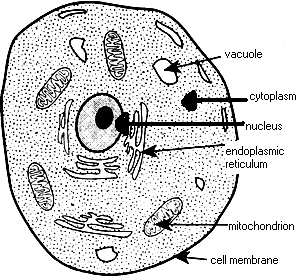

The general animal cell contains roughly 14 different organelle. These help the cell reproduce, store organic molecules and process the organic molecules into ATP (energy for the cell). Generally they function similar to a humans bodies organs, allowing them to survive and complete their specialized tasks.

These organelle are:
What are cells general functions? Well I’ve determined that there are three main jobs that the cells do/can do. The first is the ability to let various organic molecules pass through their cell membrane to process the molecules and turn them into ATP for energy. This allows them to produce proteins to replace degrading or exported proteins and reproduce. Cells can also reproduce themselves by copying their DNA to two new cells creating an exponential growth pattern.
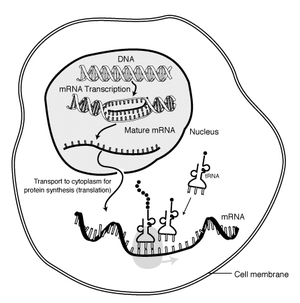
We’ll be using Minecraft in creative mode (You can check out my minecraft guide here) to create a semi-interactive model of a cell in Minecraft. Basically the students will learn about the structure, and functions of animal cells and even plant cell, if you’d like, and then convert that knowledge into a 2d model of a cell. As an example you can check this world save out of a plant cell.

  • I’m going to start placing challenges for each task I give. So for this one
    • Challenge one:
      • Create a plant cell, animal cell and prokaryotic cell.
    • Challenge two:
      • Make the model 3d, heh, so basically check out real 3d models of cells and see if you can replicate it.
      • Challenge Three
        • Animate the ingame model with the functions of the cell.
          • This isn’t an easy challenge and I couldn’t do it myself. I’d imagine that using redstone and some advanced game mechanics.
            • A friends Minecraft creations, he has some tutorials but mostly look at his creations channel, their pretty informative. Here
            • Redstone rules
                • (Editors note: redstone is pretty complicated stuff to mess with considering the rest of the game’s mechanics are… simple. So this is a very hard task and would rate “super, super, advanced” in the rubric)
Also as a note, this project should be done with a group, especially building the Cell in minecraft.
Scoring guide for this project.

Tasks:
Emerging
Developing
Proficient
Advanced.
Minecraft Cell model
Model is missing several organelle and they were placed in the wrong areas of the cell.
Model has all of the organelle but a few or all are placed in the wrong position of the cell.
Model has all of the organelle for each cell type they’re all in the correct position and even labeled but are only in 2D.
The model has all of the correct organelle, they’re in the proper position and all are labeled. It is in 3D and scaled so you can walk through the cell and see each part of the cell as if you were on a tour.

Monday, January 12, 2015

Mendelian Inheritance in gaming.


This post marks the “official” start of my science based scenarios. We’ll be using Minecraft for this scenario with the mod Advanced Genetics. This will cover Chugach standards 9.6-9.9, which ask for the explanation of basic genetic principles: Mendelian, genetic errors, applied genetics, and how DNA relates to inheritance. Since we’ll be using Minecraft I’ve created a guide for installing Minecraft and Minecraft mods here.

Mendelian Inheritance is a genetic theory developed in 1865 and 1866 by Gregor Johann Mendel who initially derived three laws of inheritance. He experimented with pea plants, cross-breeding them to determine what traits passed down through their generations. After roughly 5000 trials he wrote two papers describing a limited yet initial scientific understanding of modern genetics. The three laws of inheritance are; the law of segregation, the law of independent assortment, and the law of dominance.

The law of segregation states that each parent carries two alleles per gene trait that are randomly chosen and passed down to the offspring. Meaning that both the sperm and egg carry one alleles and when those meet the offspring is united with both alleles. Meaning that the offspring receives one gene trait from both mother and father. The law of independent assortment states that each pair of alleles segregates separately of other alleles. Meaning that each gene trait chosen does correspond in anyway with other chosen gene traits. Alleles possess either dominant or recessive traits, if a trait possess a dominant type then it will override recessive traits, this is known as the law of dominance.

Going smaller, DNA is also important in inheritance. Since it’s the brain of each cell, holding the information needed to create life. DNA from both parents is split in half, giving the child one half from each parent making a similar DNA strand, but completely different. Of course as people progress through life their DNA copies itself onto each new cell that it replicates, copying itself eventually leads to a mistake. which is generally caused by an external environment and or just a mishap. Leading to a mutation in the DNA that can be harmful or beneficial for the subject- and passed down to future offspring.

Humans can also manipulate DNA through science, this process is called applied genetics. It’s used to create bacteria, modify viruses, adapt plants to new environments and even breed animals for certain qualities. This has been done for thousands of years through animal and plant breeding programs. We can now do this in the laboratory directly. Slowly, over time this progression has allowed for humans to strategically modify DNA to meet human needs.

This leads perfectly into Minecraft’s handy dandy Advanced Genetics Mod. The mod allows you to scrape skin scales off of any mob in game, giving that mobs certain skin scale. And once you bring those skin scales through the plethora of gene extracting and copying machines you can synthesize that mobs unique ability, like exploding, flying, more health, so on and so forth.


The players goal in game is to collect all of the skin scales and absorb their powers through using the newly added machines. However, to tie this into standards the players must research on Applied Genetics and understand how the machines ( which are simulated after real life machines) work in game. I’ve created an Advanced Genetics mod guide here. The guide goes into great detail on how to use each function of the Advanced Genetics mod and if that doesn’t answer your technical questions their wiki should, which can be found here. As a side note, I didn’t explain the mod here because I thought the post would grow too big and cumbersome. If you would rather me explain in here, just post in the comments below and I’ll see what I can do.

Advanced Genetics Minecraft mod guide.

First steps to install Advanced Genetics 1.57 for Minecraft 1.7.10:
  • First head over to Forge’s main site
    • Forge is the go-to modders resource and framework for users and modders alike.
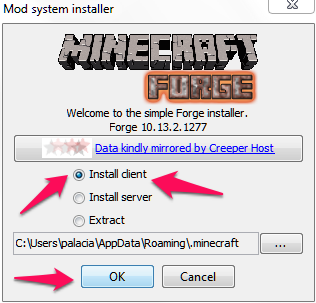
  • click on Installer-Win under the “1.7.10” latest Forge Installer:Forge installer.png
  • Once thats downloaded Double Click it. A installer should pop up, make sure that “install client is selected and then hit okay.
Installer.png
  • Once it finishes installing, you should be good to go Forge wise. Now for the actual mod.
  • Head here to download the mod.
  • You should see this:
Adfly link.jpg
  • DO NOT CLICK ANYTHING BUT “Skip Add” in the top right hand corner, it counts down from five, then click it.
  • Once you download the installer you can doubleclick it and this cute little window will pop up
Mod installer.jpg
  • I already have the mod installed, so it shows “re-install mod” but for you it should show “install” click that and bam the mod should start installing.
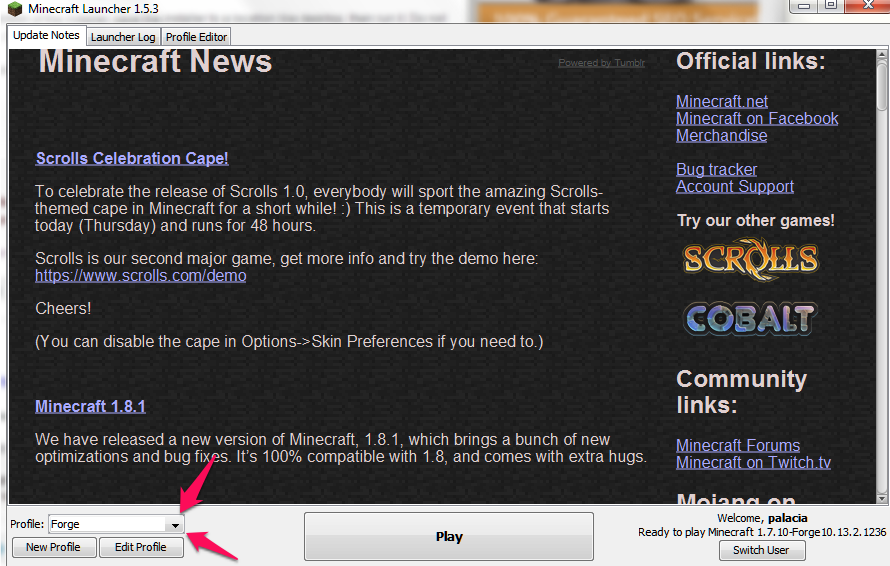
  • Now once it’s finished start up your game and login. You should be met with something like this:
Profiles.png
  • Make sure that your profile looks like mine, I.E says “Forge”. Then you can click play,
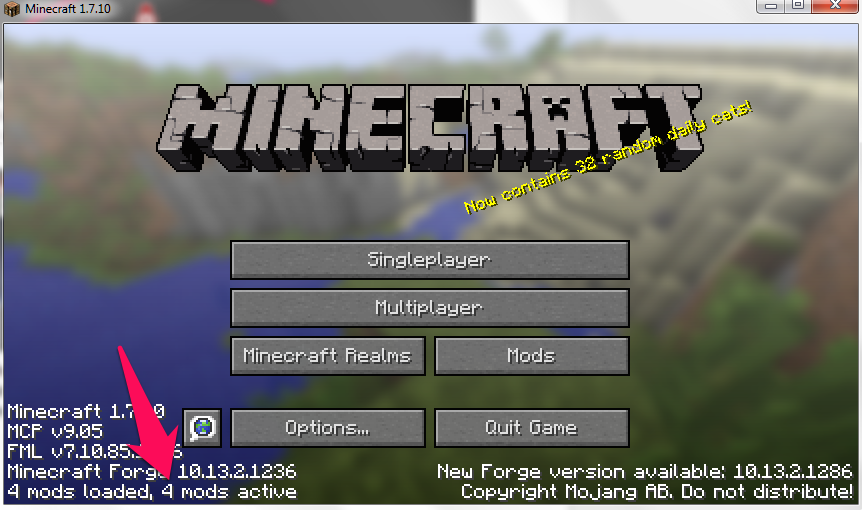
  • Once you’ve entered the main screen of your game you should see in the bottom left hand corner you should see:
ingame 4mods.png
  • If you see this then you have successfully installed Advanced Genetics.
  • Now hit single player and create a new world. Make sure to set the gamemode to creative by clicking the Gamemode button.
Gameworld.png

Now that we’re in game we can discuss the types of scenarios and game that you can employ the students to do. So the mod basics are pretty easy to grasp, you can check out a detailed guide here. Basically the process involves getting animal skin scales and going through decryption process and producing a “power-up cell” that gives the player certain abilities.

So my example scenario for this mod is straightforward and fun for the students. Their goal is to collect all of the available power ups through collecting skin scales cloning and combining cells. This will require the students to first understand how the mod works, through use of the wiki, and then learning how scientist in real life study, and modify cells.

Tuesday, October 21, 2014

MA 10.12 Uses area to calculate construction costs in Minecraft.

Welcome to the first post in the Minecraft Educational series. In Minecraft you can build any sort of imaginable structures, artwork and even mechanical devices. Because of this I figured it would practical to use Minecraft as the platform for calculating construction costs using math. Of course in Minecraft there isn't really a "currency" system developed, so we'll just be calculating how many of each block we'll need to complete this task.

Lets go straight into the activity and start building:

  1. So for this mode you'll be wanting to use creative mode(click through the tabs to change mode), so create a game
  2. Next open it up for local network play:
  3. Now split everyone up into groups of four or five. Now everyone should join your local server by going into multi-player then your local game should pop up on the local network, just double click and join, bam, you're in
  4. Now once you're in the game you'll all want to lay out an area to build your buildings, should take around five minutes.( maybe suggest building a small town and have the students build different parts of the town )
  5. Each group should make one building, the building need to be 200sqft(you can find info on sqft here:link), and you must lay out the construction materials, 
  6. Make sure to compile a list before you make the building, so that you can get exactly what you need, however you'll only be able to get resources once and no more. So if you run out you run out and have to redesign your building to fit according. The team who doesn't run out of building supplies and completes their house the fastest wins the game.
Make sure to turn in your housing calculations so that you can get credit for the task. I hope you enjoyed this and if you'd like to comment please do so below or email me at cymeks.hun@gmail.com

Wednesday, October 15, 2014

Minecraft Educational Simulation installation and about guide.

Welcome to the first of many Minecraft educational simulations. The goal of these simulations is to give you, the teacher, a set challenges in Minecraft for your students to compete in and learn through participating in these challenges. The challenges are designed to educate through examples and student reflection, they will be hard, and will require complex problem solving that will satisfying various areas of science, complex problem solving and mathematical skills. Some good examples of the challenges will be: survival with limited food supply, semi-complex( to the best of my abilities, heh) puzzle solving using math and pattern recognition, building challenges(building in certain ways, and certain must have features).
                The setup of the simulations will be easy, all you'll have to do is download the Minecraft Simulation file from here(link), next you'll need to place that file into your Minecraft saves folder.

  1. For windows:
    1. To locate the saves folder go to start
    2. then in the search box located at the bottom of the start menu type: "run"
    3. A new window should pull up called run
      1. seen here:
    4. type in the highlighted "%appdata%" ass seen above and hit "ok".
    5. a folder will open up with several more folders
    6. You'll want to go through the folders and find a folder called ".minecraft"
      1. seen here: 
      2. Open up this folder
      3. Once there you'll find minecrafts source files and important stuff, find the folder named saves and drag the downloaded folder into saves and BAM you're done. 
  2. for mac(once again I have a PC so lol, this should be interesting in fact I'll just link a nice well done guide for you
    1. Link
And bam you're done with installing, now you can enjoy the actually fruit of the simulation I made. As always  your friendly internet educational gamer Palacia signing out.


Tuesday, October 14, 2014

Minecraft Installation guide.

Welcome to my guide on installing Minecraft. Hopefully I can explain this well enough that everyone can use Minecraft to it's fullest without issues.

  1. Starting off, you'll want to head to here: link
    1. Windows:
      1. there should be a minecraft.exe underlined and blue, click that to download the windows client:
    2. For Mac OS X click the Minecraft.dmg right below the minecraft.exe.
    3. Once minecraft is downloaded onto your computer, shouldn't take too long, go into your downloads folder
      1. Windows:
        1. Go to computer through, Start/Computer/ 
        2. Then 
        3. click the downloads folder, once there scan through the files and find "Minecraft.exe"
        4. Drag "Minecraft.exe" onto your desktop, then open the file.
      2. Mac:
        1. Heh, since I have a Windows machine macs a bit harder to discribe, but it's the same basic premise. You navigate to where the file download, most likely your downloads folder, once there drag in onto your desktop and then open it
    4. Now once you've opened minecraft it should download some files which may take a little bit of time, but once it's done you'll be met with this:
    5. At this point you need to login with your given accounts, after that it should download a little bit more content then you're all good to go.
If you need anymore help feel free to post in the comments or email me at cymeks.hun@gmail.com, as always Palacia signing out.


Minecraft in educational gaming.


Using Minecraft as an Educational Tool
Core Elements of Minecraft
Welcome back to another entry in Pal's Educational Gaming guides. Today we'll be focusing on Minecraft and how I personally suggest using it as an educational tool. Minecraft has become one the largest and most popular game used in education these days, and if you want to join in on this fantastic tool, but you don't know how to use Minecraft. Don't worry because I'll cover everything you need to know from installing the game to several scenarios that cover multiple subject areas and standards.
  1. The following are the core elements of Minecraft, These are the core principles that players do.
    1. gathering food for survival.
      1. At first players will gather food randomly, collecting it only when needed. However, later on in the game players generally start:
        1. Farming
          1. Players can plant seeds gathered from various locations to create farms that produce sustainable food.
        2. herding
          1. Gathering animals with wheat, and then bringing them to pens to start breeding and create a sustainable system(hey looks here is a hint to an education aspect of Minecraft)
    2. Players will want to dig deep into Minecrafts block based crust to explore and collect various ores and minerals to use for weapons, tools and building block materials.
        1. So as the name "Mine"craft depicts the goal of the game is to explore and mine throughout the world. The deeper you go into the depths of Minecraft the rarer materials you find, the most valued being diamonds. (Another hint towards Minecraft's educational values)
    3.  building
      1. Have you ever thought why is Minecraft so popular? Well at it's very core there is one aspect of the game done so well that it manages to keep a massive population of people: building. Why? Because it's so simple, you take one block and place it on another, but it's complex enough to make things like this. That image is a full scale replica of Minas Tirith, the last stronghold of man in middle earth. Made entirely with Minecraft blocks.

    4. Logic of red stone
      1. Another key potential educational avenue of Minecraft is it's rather complex "redstone" power systems. Basically in the game you'll find red stone by mining in the deep depths. This shiny red dust, allows you to create intricate traps, self operating systems and powered rail carts. A good example of this is a RAM simulator in minecraft. Link. Honestly I'm not entirely sure how he made it work, but it's just a sample with what you can do using this system.
So in conclusion Minecraft has an infinity high potential to be used in education as a very very powerful tool that can cover most topics. It's also simple enough for anyone to use and contains the content to keep people forever entertained and educated. There's also a large community of players that make modifications of the game to install additional content, you can find that here. I hope you enjoyed this review, if you find the "Minecraft" label on the side bar you should be able to find exercises that cover standards using minecraft along with an installation guide and eventually modding guides.
As always Pal the Educational Gamer signing out.